See your sales at a glance
Each deal is a card on a board. Move it as the conversation moves. Every stage has a win chance, so the forecast shows what is likely to close, not just what is open.
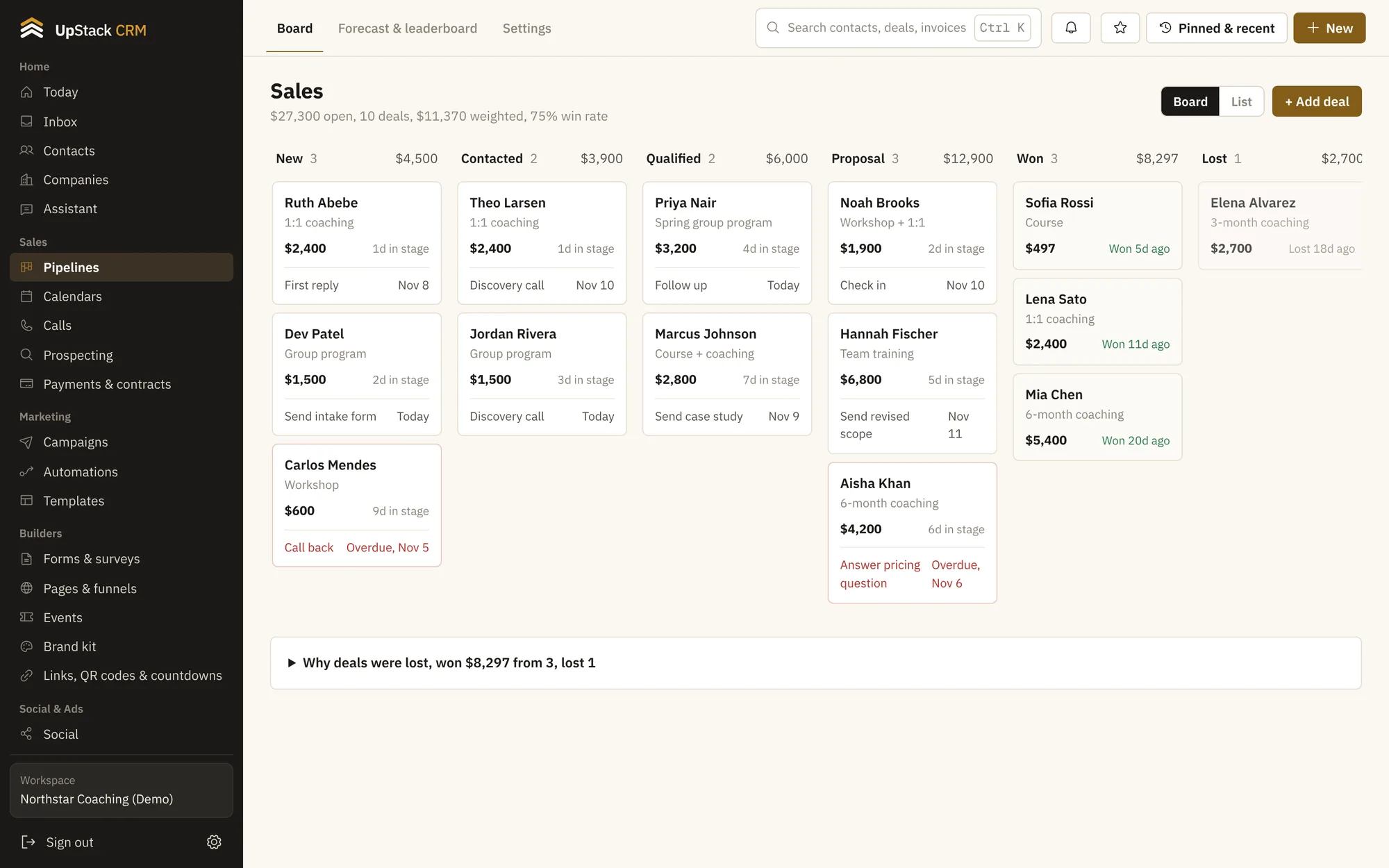
Replaces sales tracking spreadsheet, sticky notes on a wall.
What you can do
Boards you can shape
Make one pipeline for coaching and another for workshops. Name the stages whatever you like.
Next steps on every deal
Set what happens next and when. Deals with no next step stand out.
Stale deal alerts
Set how many days a deal can sit in a stage before it gets flagged.
Forecast and leaderboard
See expected revenue by month and who closed what.
Stage playbooks
Write the checklist for each stage so everyone on the team follows the same steps.
Quotas and commissions
Set targets per person and track commissions on won deals.
Setting it up
Check the forecast
Open the forecast page for the month and see what is on track.
Add deals
Create them by hand, from a form, or from an automation.
Set your stages
Start with the default board or build your own.
Questions
Works with contacts and crm, automations and reports and analytics.
Can I have more than one pipeline?
Yes. Make as many as you need.
Can a deal move on its own?
Yes. An automation can move a deal when someone books, pays or replies.