Shared inbox
Answer everyone from one inbox
Emails and texts land in one list, each tied to the contact. Assign a conversation, snooze it, or close it. Your team can see who is handling what.
Replaces shared gmail inbox, separate texting app.
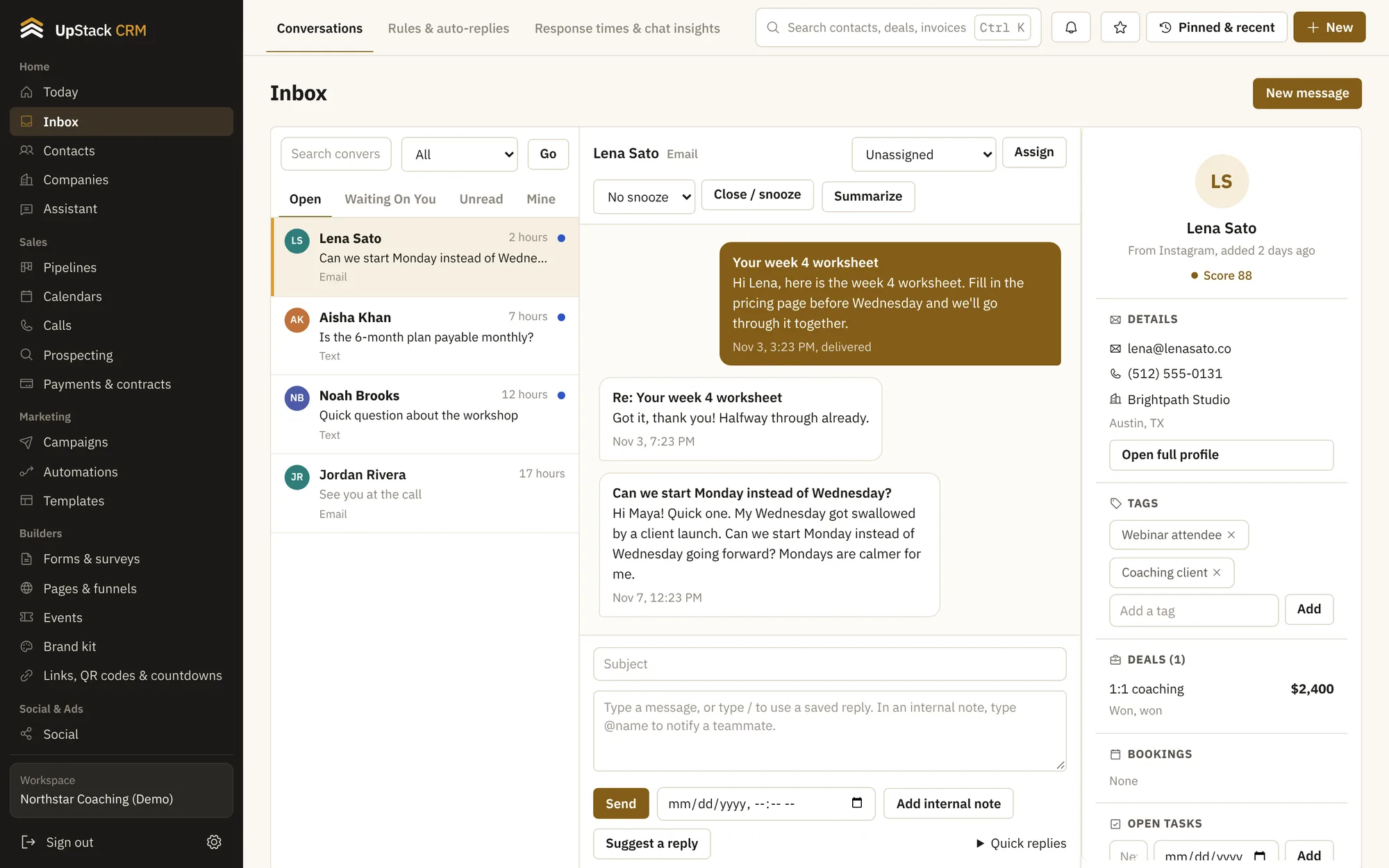
One thread per person
Email and text with the same person live in the same conversation.
Assign and snooze
Give a conversation to a teammate or push it to tomorrow.
Rules and auto-replies
Reply automatically outside office hours, or route messages by keyword.
Saved replies
Keep your answers to common questions ready to drop in.
Response times
See how fast you reply and where messages wait too long.
Summaries and sentiment
With an AI key connected, long threads get a short summary and a mood label.
Setting it up
- 1
Connect email and text
Add your own email and phone providers in settings.
- 2
Reply from the inbox
Everything you send is saved to the contact.
- 3
Set a rule
Let simple questions answer themselves.
Questions
Works with email and text campaigns and calls and power dialer.
Whose email provider do I use?
Your own. You connect your email and text accounts and pay those providers directly, with no markup from us.
Can I use WhatsApp, Facebook or Instagram?
The inbox supports those channels when you connect them.